Airtable alternative
The Airtable alternative your whole team can afford
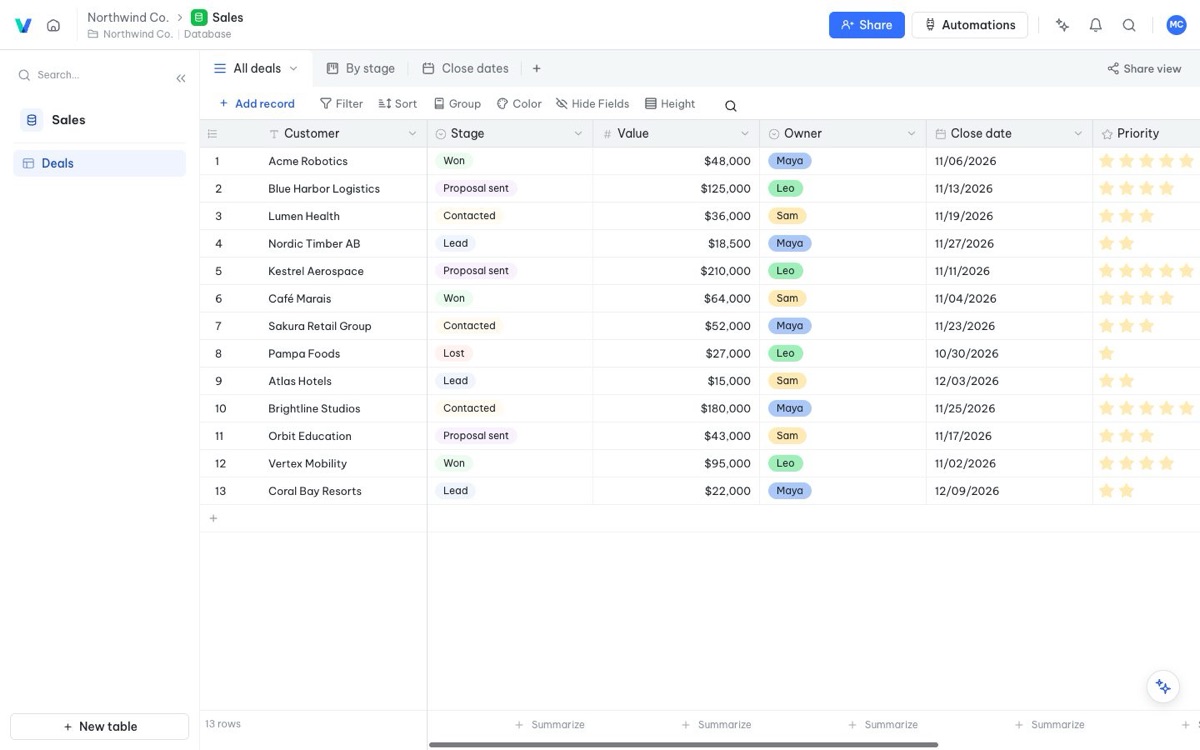
Linked tables, grid, Kanban, calendar, Gantt and form views, automations, row-level permissions and an AI assistant. Free for up to 20 members, and $5 per member a month when you grow.
Free for up to 20 members · No credit card needed
Why teams look for an Airtable alternative
Airtable made the no-code database popular, and for good reason. But it gets expensive fast once more than a few people need to edit. The free plan stops at 5 editors and 1,000 records per base, so most teams hit a wall within weeks and have to pay for every seat.
Vinabase gives you the parts most teams actually use, linked tables, views, forms, automations and permissions, with a free plan that fits up to 20 members and a paid plan at $5 per member a month.
Vinabase vs Airtable at a glance
| Vinabase | Airtable | |
|---|---|---|
| Free plan | Up to 20 members | Up to 5 editors |
| Rows on the free plan | 5,000 | 1,000 per base |
| Automation runs on the free plan | 1,000 a month | 100 a month |
| Paid plan price | $5 per member a month (Pro) | $20 per seat a month billed yearly, $24 monthly (Team) |
| Rows on the paid plan | 500,000 | 50,000 per base (Team) |
| Cost for a team of 10, per year | $600 | $2,400 (Team, billed yearly) |
Airtable figures are from Airtable's public pricing as of November 2026 and may change, check airtable.com/pricing for the latest.
Everything you use in Airtable, in one place
Linked tables and typed fields
Text, numbers, currency, dates, single and multiple select, files, people, links to other tables, lookups, rollups and formulas.
Many views of the same data
Grid, Kanban, calendar, Gantt with task dependencies, gallery and forms, each with its own filters, sorting and grouping.
Automations and approvals
Notify people, send emails, create rows or ask for approval when a row matches a condition, a date arrives or someone clicks a button.
Permissions down to the row
Sales reps see only their own customers, and sensitive fields like salary stay hidden from people who shouldn't see them.
Dashboards
Live charts and summary numbers built from your tables, updated as the data changes.
AI built in
Ask the assistant to build a table, clean up data or answer a question about your records, and use AI fields to write content.
Moving from Airtable to Vinabase
- Export your baseIn Airtable, download each table as CSV from the view menu.
- Import into VinabaseCreate a database and import the CSV files. Each one becomes a table, and you set each column to the right field type in a click.
- Link your tables againTurn the columns that point to other tables into link fields, then add lookups and rollups where you need them.
- Rebuild views and automationsRecreate the Kanban, calendar and form views your team uses, and set up the automations that matter most first.
- Invite your teamAdd members, set roles and row-level permissions, and you're live.
Most small teams move a working base in an afternoon. If you get stuck, write to hello@vinabase.app and we'll help.
When Airtable may still be the better fit
We'd rather you pick the right tool. Airtable has been around much longer, so it has a larger marketplace of extensions and ready-made integrations, and more third-party templates and tutorials. If your workflow depends on a specific Airtable extension, check that you can replace it before you move.
If what you need is shared tables, views, automations and permissions at a price that works for the whole team, Vinabase is built for exactly that.
FAQ
Frequently asked questions
Is Vinabase really cheaper than Airtable?
Yes. Vinabase Pro is $5 per member a month. Airtable's Team plan is $20 per seat a month billed yearly, or $24 billed monthly. For a team of 10 that's $600 a year with Vinabase against $2,400 with Airtable.
Can I import my Airtable data?
Yes. Export each Airtable table as CSV and import it into Vinabase. Then set the field types and turn columns back into links between tables.
Does Vinabase have a free plan?
Yes. The free plan includes up to 20 members, 5,000 rows, 2 GB of files, 1,000 automation runs a month and 20 AI messages a day.
Does Vinabase have an API?
Yes. Every table has a REST API, and an MCP server lets AI agents work with your data.
Can I leave Vinabase later?
Yes. You can export any table to Excel, CSV or JSON at any time. Your data stays yours.
More ways teams use Vinabase
One workspace, many workflows
Switch to Vinabase and keep the budget for your team
Create your first workspace in under a minute.
Start for free